Features

Twenty features.One job.

Every one of them exists to get the right Instagram DM to the right person, about three seconds after they ask, without you picking up your phone.

Triggers

Catch every interaction

Wherever someone asks, the answer goes out. Comments, reels, stories, mentions, ads and your inbox all fire the same automation.

Post comments

Every plan

Someone comments your keyword, they get your DM about three seconds later. Every comment without it is left alone.

How Post comments works

Reel comments

Every plan

Reels are where the strangers are. Every keyword comment gets the link, however far the reel travels.

How Reel comments works

Story replies

Every plan

β€œSend me the link” in reply to a story gets answered the way a comment would. Same automation, different trigger.

How Story replies works

Story mentions

Someone tags you in their story. They get a thank-you, a code or a link back, automatically, while the post is still live.

How Story mentions works

Sponsored ad comments

β€œHow much?” under a paid post gets a price, a link and a code while they are still looking. Your ad spend stops leaking.

How Sponsored ad comments works

Global Triggers

Every plan

Set β€œshipping” or β€œrestock” once and it answers on every post, reel, story and DM, including the ones you post next month.

How Global Triggers works

Growth

Grow the account and the list

A comment is attention. These turn it into a follower, an email address and a second sale.

Follow-Gated DMs

Lite and up

Check the follow first, then send the link. Every launch grows the account instead of just the click count.

How Follow-Gated DMs works

Comment Auto Reply

Lite and up

A public reply under their comment, worded differently every time, so the thread looks alive and everyone knows to check their DMs.

How Comment Auto Reply works

Email Collector

Lite and up

Ask for the email inside the DM before the link goes out. Export it as CSV or sync it to your email tool, so the audience is yours.

How Email Collector works

Follow Up

Lite and up

A second message for the people who got the link and went quiet, written by you and sent on your timing.

How Follow Up works

Suggest More

Lite and up

After the link, a nudge toward the next thing they are likely to want: the matching product, the next guide, the bundle.

Reliability

Survive the viral night

Meta limits how fast any tool can send DMs. When a reel takes off at 3am, these make sure commenter 4,000 gets exactly what commenter one got.

Excess DM Queue

Lite and up

Anything over the sending limit waits in line, in order, instead of being dropped. The queue drains as fast as Meta allows.

How Excess DM Queue works

SendBack

Lite and up

Goes back for the interactions that were skipped or delayed while a post spiked, and sends them the DM they asked for.

How SendBack works

Conversations

Build the conversation

Most automations are one message. When yours needs to be more, these give it buttons, branches and a head start.

Conversation Starters

Every plan

Up to four tappable prompts waiting when someone opens your inbox, so nobody has to think of an opening line.

How Conversation Starters works

Welcome Openers

A greeting for first-time messages with up to four quick-reply buttons: the product, the booking page, the free thing.

How Welcome Openers works

Smart Menu

A menu of up to four buttons inside your DMs. Links, booking pages and key resources, one tap away.

How Smart Menu works

Flow Automation

When one message isn't enough: branch on their answer, qualify the lead, then send the right thing. There when you want it, never required.

How Flow Automation works

Template Library

Every plan

Proven templates for launches, giveaways and lead magnets, so your first campaign is an edit, not a blank page.

AI

AI in your voice

Keyword DMs go out exactly as you wrote them. For everything a keyword can't predict, the AI answers the way you would.

AI inbox replies

For the questions no keyword covers. Trained on your voice, your offers and your actual slang. The tell isn't that it replies fast. It's that people reply back.

How AI inbox replies works

AI-generated triggers

Every plan

Not sure which words to listen for? Let AI suggest the triggers for a post, then keep the ones you like.

How AI-generated triggers works

Integrations

Plugs into what you already sell with

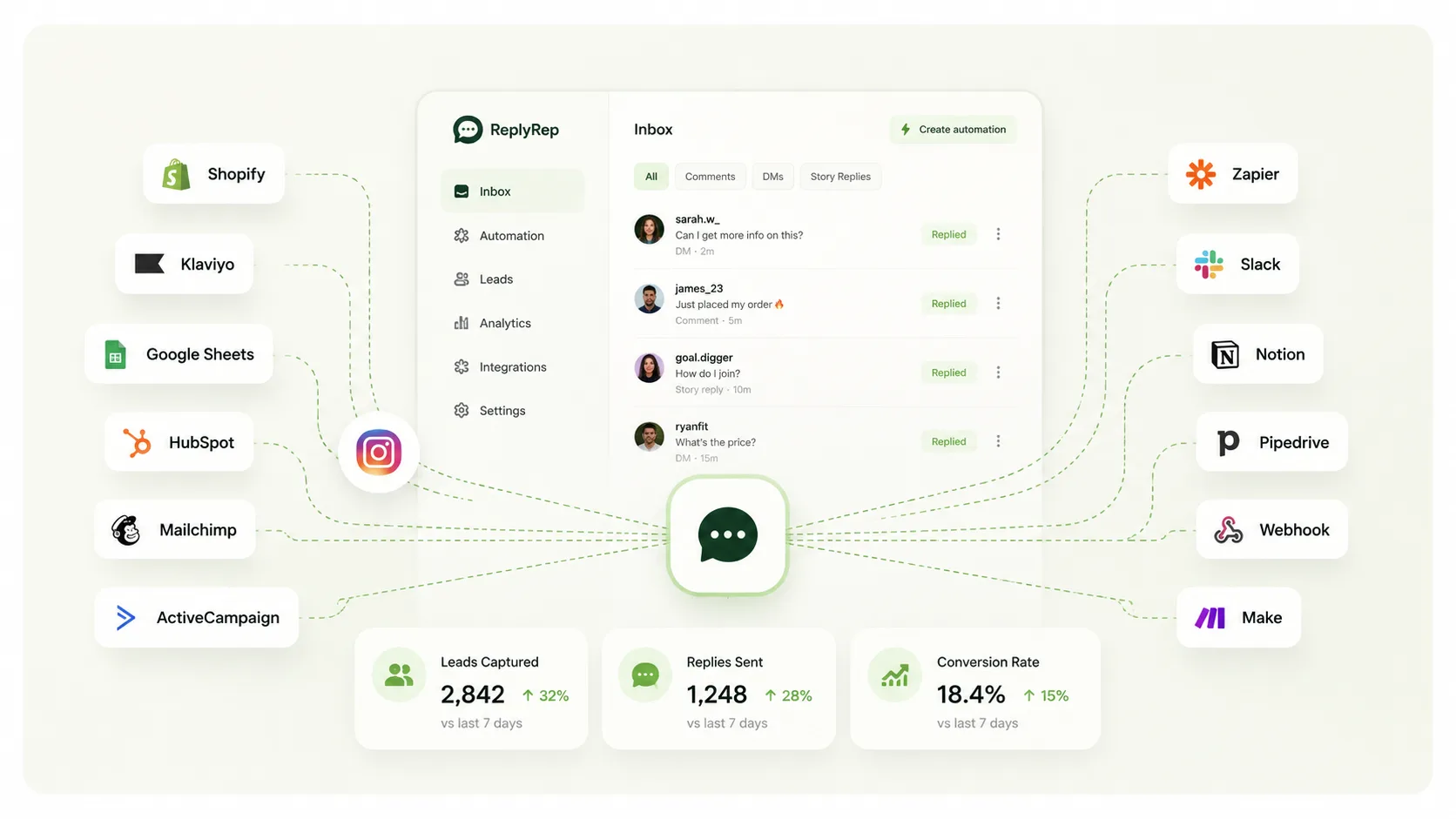
Send people to Shopify, a booking page, a course or your email list, and send the leads you capture to the tools you already run on. Wherever the money actually happens.
  • Shopify
  • Klaviyo
  • Google Sheets
  • HubSpot
  • Mailchimp
  • ActiveCampaign
  • Zapier
  • Slack
  • Notion
  • Pipedrive
  • Webhooks
  • Make
The ReplyRep inbox at the centre, connected to Shopify, Klaviyo, Google Sheets, HubSpot, Mailchimp, ActiveCampaign, Zapier, Slack, Notion, Pipedrive, webhooks and Make.

From people using it

Receipts, not promises

  • $1.2M in sales from comments

    @ceramics.by.nadiaHandmade ceramics Β· 231K followers
  • 9 hours a week, handed back

    @budgetbossmayaMaya Okonkwo, Founder, Budget Boss Β· 67.8K followers
  • 34K new followers in 60 days

    @dropship.dispatchEcommerce Β· 310K followers
  • 62% of DMs get a reply

    @alice.trainsAlice Nolan, Business coach Β· 125K followers

Before you ask

Questions you might have

Will this get my Instagram account banned?

No. ReplyRep runs on Meta's official Instagram API and is a Meta Business Partner. We never ask for your password, we stay inside Meta's rate limits, and we only message people who interacted with you first. That last part is the whole difference between automation and spam.

Do the DMs sound like a robot?

Keyword DMs go out exactly as you wrote them: your words, your emoji, your line breaks, with their first name filled in. For open questions in your inbox, the AI replies in your voice, trained on your offers and the way you actually write.

What happens when a reel actually goes viral?

Meta caps how fast any tool can send. On paid plans, anything over that limit waits in the Excess DM Queue, in order, instead of being dropped, and SendBack goes back for anything that was skipped or delayed. Plans are sized by monthly DMs, so size yours for your busiest month.

Do I need a Business or Creator account?

Yes. Meta's official API works with professional Instagram accounts, Business or Creator. Switching is free in the Instagram app's settings and takes a minute.

How long does setup actually take?

Most people are live in about four minutes: connect the account, pick a post, set a keyword, write the DM. No flowchart required. Comment your own keyword to test it before anyone else sees it.

How is this different from ManyChat?

ManyChat bills by active contacts: its free plan covers 25 contacts, and paid plans start at $14 a month for 250. ReplyRep bills by DMs, starting with 2,000 free every month. If a reel brings 3,000 new people into your DMs, ManyChat's cheapest option that month is about $54. On ReplyRep that is 3,000 DMs, one each, which fits inside Lite at $10. ManyChat prices as listed on its pricing page on 19 October 2026. See the full comparison.

Still stuck on something? Ask us and a person answers.

See one land on your own post

Connect an account, pick a keyword, write one message. The free plan has 2,000 DMs a month, no card and no trial timer, so you will know inside a day whether it's worth paying for.